

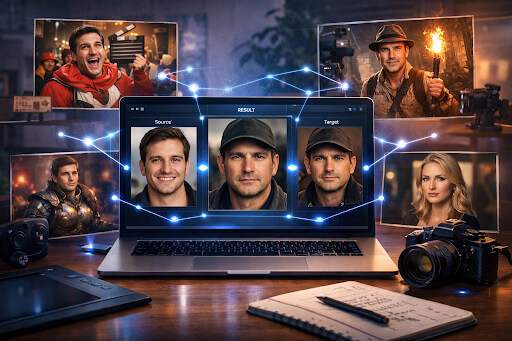
Replacing one face with another used to require complex editing software and hours of manual work. Today, AI has simplified the process. A modern face swap tool can analyze facial structure, lighting, and expressions to replace a face in an image with another one in seconds. The results can be realistic enough for visual effects work or playful enough for memes.
The demand for face swapping has grown across several creative industries. Social media creators use it to produce viral meme content. Filmmakers and VFX artists experiment with it to test casting ideas or visualize scenes. Game developers use face swaps to create character portraits or concept art quickly. Portrait editing and digital art communities also use these tools to experiment with identity, expression, and style.
AI face swap tools allow users to upload an original photo, add a target face, and generate a blended result that matches lighting, skin tone, and facial orientation. This list highlights five accessible platforms that provide face-swapping features and support creative workflows ranging from casual meme creation to early-stage visual effects testing.
Face swap tools explained
Face swap technology relies on computer vision and AI image models to detect facial landmarks such as eyes, nose, jawline, and expression patterns. The system maps these points from the source face to the target face and reconstructs the image while maintaining lighting consistency and texture.
Modern tools often include features that improve realism and speed:
- facial landmark detection for accurate placement
• automatic lighting and skin tone matching
• expression alignment between faces
• high resolution output for editing workflows
• privacy controls for uploaded images
These tools support different creative tasks. Meme creators use them to generate humorous images quickly. VFX artists test visual concepts before moving to advanced software. Character designs, avatars, and portraits are experimented with by game creators.
The following tools offer accessible entry points for creators who want to explore face swapping without complex editing pipelines.
1. Invideo
Invideo is an AI-powered, cloud-based visual content creation platform designed to simplify how creators produce visual media. It combines video tools, image generation models, audio tools, music capabilities, and quick AI utilities into a single workspace. Instead of switching between multiple tools or platforms for editing, generation, and publishing, creators can work across video, images, audio, and music within the same environment.
Among its quick creative utilities is the face swap free tool. It allows users to upload a base photo, add a new face, and generate a blended result within seconds. The system analyzes facial structure and automatically adjusts lighting, alignment, and texture so the output appears natural.
Invideo supports several creative face swap scenarios commonly used online. Users can experiment with head swaps, gender swaps, multi-face swaps, celebrity style swaps, painting style transformations, and meme face swaps. These use cases make the tool practical for meme creators, visual storytellers, and artists exploring playful content formats.
The platform emphasizes hyper-realistic results. Its AI models rely on diffusion model technology that reconstructs faces while preserving lighting accuracy and skin texture consistency. Expression transfer ensures that the swapped face retains the emotional tone and direction of the original image. This improves realism when faces appear at different angles or lighting conditions.
Several technical capabilities make the tool accessible for everyday use:
- hyper-realistic facial blending
• expression transfer between faces
• fast processing times
• high-resolution image output
• privacy-focused processing
• JPG, PNG, and WebP format support
This AI platform does not store, share, or sell uploaded personal data. The platform maintains policies that emphasize consent and responsible use when working with facial imagery. These guidelines help creators use face swapping responsibly while protecting identity and likeness rights.
Another advantage is workflow integration. Since invideo functions as a broader creative suite, users can combine face swap outputs with other media tools such as video creation, image editing, music generation, or narration workflows. For creators who want to move from static imagery to video storytelling, the same workspace also functions as a video maker app that can transform ideas into visual narratives.
It allows users to perform hyper-realistic photo face swaps for free with limited usage. For meme creators, digital artists, and content creators experimenting with visual storytelling, it provides a quick way to generate new visuals without complicated editing steps.
2. Icons8 Face Swapper
Icons8 Face Swapper is a browser-based image tool designed for simple and quick face replacement tasks. The platform focuses on usability and requires only two images to generate results. Users upload a source photo and the face they want to insert, and the system performs automated alignment.
The tool analyzes facial landmarks and reconstructs the blended image while adjusting for orientation and lighting. The goal is to produce a result that looks natural while minimizing the need for manual editing.
For creators who want to experiment with digital art or meme creation, the interface is straightforward. It works directly inside a browser, which means there is no need to install editing software or configure plugins.
Common uses include meme content creation, visual experimentation, and concept art drafts. Because the process is fast, it is useful when testing multiple variations of an image.
The tool includes several useful characteristics:
- automatic facial alignment and blending
• browser-based workflow
• quick image processing
• support for common image formats
• simple upload and download system
Creators working in early-stage visual effects planning may also use it for quick mockups. Instead of committing to a full editing pipeline, artists can test how different actors or characters might appear in a scene.
For game developers, the tool can help visualize character portraits or NPC concepts before moving to final artwork production. This allows quick exploration of ideas without heavy technical overhead.
Icons8 Face Swapper focuses on accessibility. While it does not include advanced editing tools, it provides a simple and reliable method for generating face swap visuals that can later be refined in other creative software.
3. DeepSwap Lite
DeepSwap Lite is an AI-driven face replacement tool that supports both photo and short video face swapping. It uses neural networks trained to detect facial structure and reconstruct images while preserving lighting and expression cues.
The system attempts to maintain consistency between the inserted face and the original scene. It analyzes pose direction, facial orientation, and shadows to produce a result that blends naturally.
For meme creators and digital artists, the platform is useful because it can generate results quickly without requiring advanced editing knowledge. Users simply upload the base image, add the new face, and allow the model to process the swap.
Several creative communities use this type of tool for experimentation. Filmmakers and visual effects artists often create quick test shots when exploring casting options or visual concepts.
Typical features include:
- AI-based facial landmark detection
• automated lighting adjustments
• photo and short clip support
• fast rendering times
• downloadable high-resolution outputs
Game developers also use tools like this for concept artwork and character portrait testing. When creating role-playing characters or narrative-driven games, face swapping can help prototype character identities quickly.
DeepSwap Lite focuses on providing an accessible entry point for creators interested in exploring face replacement technology. It works best for small creative experiments and social media visuals rather than large-scale production pipelines.
4. PhotoFunia Face Swap
PhotoFunia is known for its creative photo effects library, and its face swap tool follows the same philosophy. Instead of focusing purely on realism, the platform often integrates faces into themed scenes, artistic frames, and visual effects.
Users upload a photo, select an effect or face swap template, and allow the AI system to reconstruct the image within that context. The system adapts the face to match the lighting and environment of the chosen scene.
For meme culture and casual creativity, this approach can be particularly entertaining. Creators often use the tool to place faces into historical paintings, movie scenes, or fictional scenarios.
The workflow is intentionally simple. Most effects require only a single image upload, and the platform handles the blending automatically.
Key characteristics include:
- themed scene face swaps
• artistic visual transformations
• automated lighting adaptation
• simple browser-based editing
• quick image generation
The tool is commonly used for meme culture, parody images, and humorous digital content. Because the effects are predefined, it is easy for beginners to produce interesting visuals without needing editing experience.
Artists and designers sometimes use the platform for concept inspiration as well. By placing faces into different environments, creators can explore narrative or stylistic ideas that might later be refined using professional editing tools.
PhotoFunia remains a practical option for creators who want fast, playful face swapping without complex controls.
5. Pixble Face Swap
Pixble Face Swap focuses on generating realistic facial replacements using AI models trained to reconstruct facial geometry and lighting. The platform attempts to match the perspective of the original image so the inserted face appears naturally integrated into the scene.
Users upload the base image and the replacement face, and the system processes the swap while preserving shadows, skin tone, and orientation. This helps create results that appear more cohesive when used in portrait editing or concept art.
The platform is commonly used for creative exploration in digital portrait work. Artists experimenting with character design can test variations of facial structure and identity quickly before creating final illustrations.
The system also supports meme creation and experimental VFX testing. Because the AI attempts to maintain scene consistency, the outputs can be useful as early-stage visual references.
Notable characteristics include:
- facial perspective alignment
• skin tone and lighting matching
• automated AI reconstruction
• high resolution output generation
• simple upload-based workflow
Game artists sometimes use tools like Pixble during early development phases. It allows quick generation of reference portraits that can inspire character models or narrative artwork.
Pixble Face Swap focuses on realism and clarity, making it suitable for portrait experiments and concept visualization in creative projects.
FAQs
What is a face swap tool?
A face swap tool uses AI to replace one face in an image with another. The system analyzes facial landmarks, expressions, and lighting conditions to recreate the image with a different face while maintaining visual consistency.
Are face swap tools used in filmmaking?
Yes. Filmmakers and VFX artists often use face swapping during early concept testing. It helps visualize casting ideas or scene compositions before committing to full visual effects production.
Can game developers use face swap tools?
Game developers sometimes use face swap technology when experimenting with character portraits, NPC concepts, or narrative artwork. It allows quick iteration before creating final character models.
Are face swap images realistic?
Many modern AI systems can produce highly realistic results. Accuracy depends on image quality, lighting conditions, and the AI model used by the tool.
Is it safe to use face swap tools online?
Safety depends on the platform’s privacy policies. Responsible tools process images securely and avoid storing personal data. Users should also respect consent and copyright when working with facial images.
Are face swap tools free?
Many platforms offer limited free usage. Free versions usually allow a small number of swaps or provide lower resolution exports.
What file formats are supported?
Most face swap tools support standard formats such as JPG, PNG, and WebP. These formats work well for both web content and creative design workflows.
Conclusion
AI face swapping has become an accessible tool for creators across several fields. Meme creators use it to produce humorous content quickly. Filmmakers and VFX artists use it for concept visualization. Game developers experiment with character portraits and early-stage design ideas.
AI platforms such as Invideo, Icons8 Face Swapper, DeepSwap Lite, PhotoFunia, and Pixble show how AI can simplify what used to be a complex editing process. By automating facial detection, lighting adjustments, and blending, these tools allow creators to generate new visuals in seconds.
Face swap technology can support both personal projects and commercial creative work. However, creators should always follow ethical guidelines and respect copyright laws when using images of real people. Consent and responsible usage remain important when working with identity-based visual media.
As AI editing tools continue to evolve, creators will likely discover even more ways to use face swapping in storytelling, design, and digital art.
What creative project would you try first with a face swap tool?